STEP 2. At the top, there is a section of the home tab that says ‘’ Categories ’’. Select the type of business for which you want to book by clicking on it.
STEP 3. Then click on the business that interests you.
STEP 4. Below you will see what the business offers and its prices. Select the service you want to reserve and click the blue button ” RESERVE ”. And the button will turn red.
STEP 5. Then find the shopping cart icon, point it and click on it.
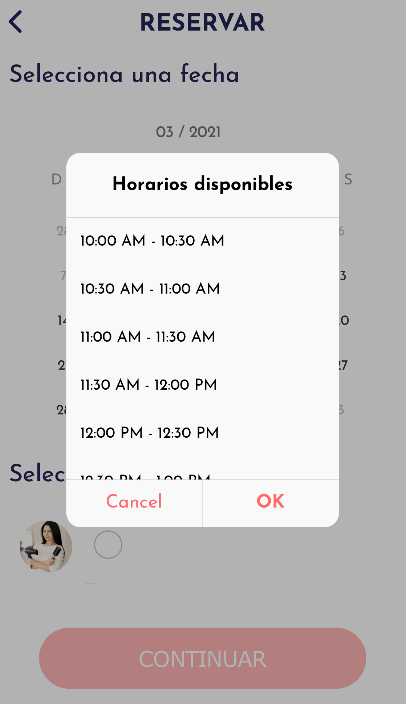
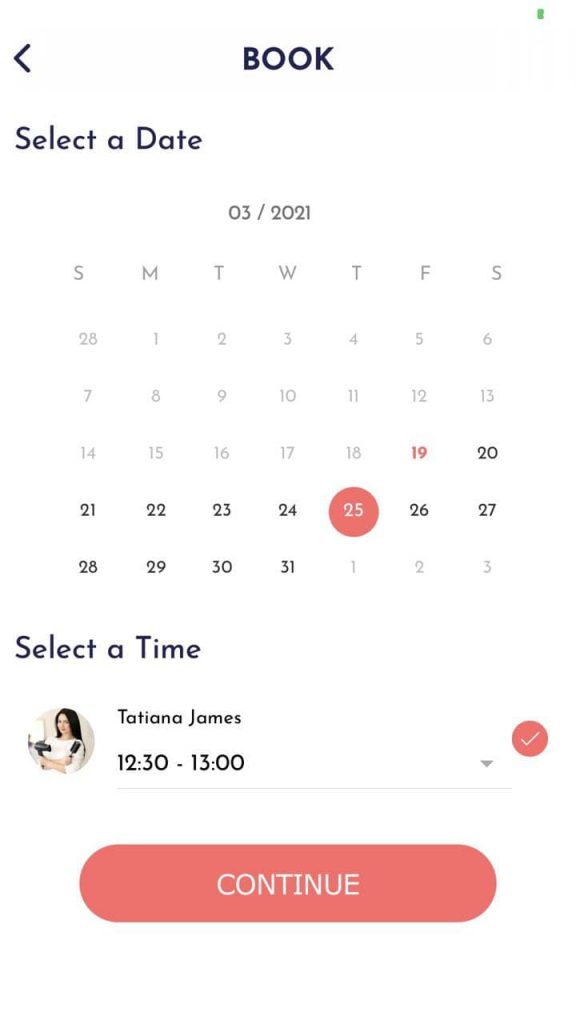
STEP 6. Select the day that you are available for your reservation (The application will show you as an option the days that the business has space to schedule the appointment).
STEP 7. And select the schedule you want. Then click on ” Continue ”.
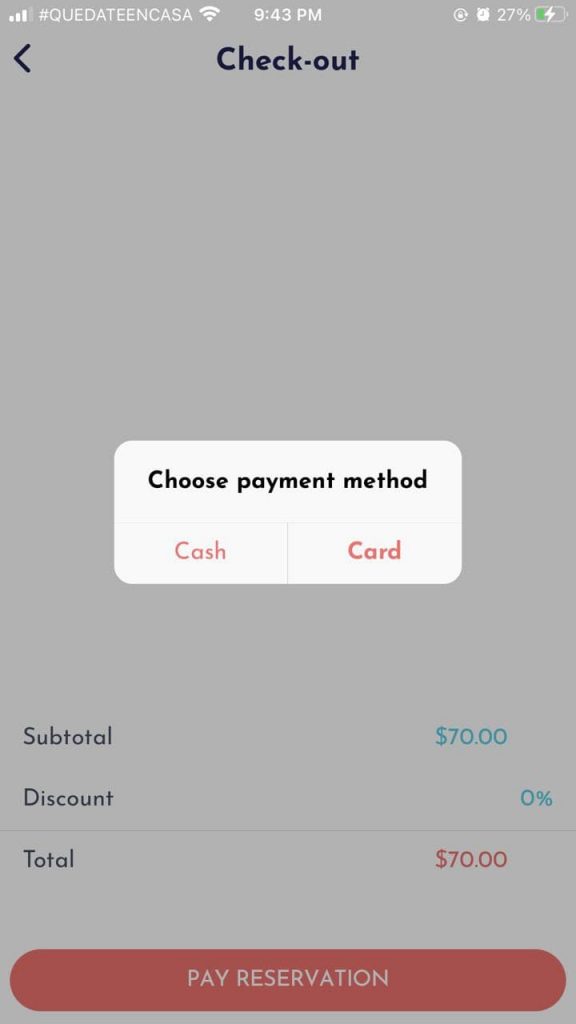
STEP 8. You will see a summary of your reservation and its cost. Click on ” Pay Reservation ”.
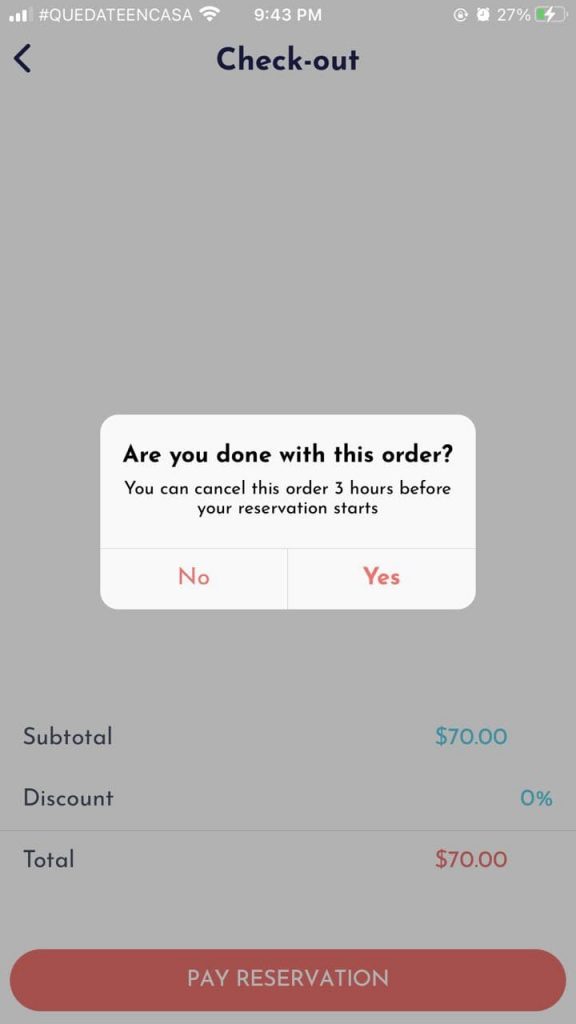
STEP 9. Choose your payment method by clicking, and answer if you are sure of your reservation.
Been spending way too much time on fly33game lately. Addictive gameplay and a bunch of different games to choose from. My thumbs are starting to hurt but I can’t stop!
Solid article! Thinking about bankroll management is key, especially with so many options now – even seeing platforms like jilibb login offering diverse games. Responsible play is crucial for long-term success at the tables.
Achei o qqbr4vip irado demais! Interface clean e fácil de usar. Deu pra sacar uma grana extra rapidinho. Recomendo pra quem busca uma diversão com chances de ganhar! Confere lá: qqbr4vip
Finding efficient AI tools can save countless hours-tyy.AI really streamlines the search. Their curation of AI Marketing Tools is especially impressive for professionals looking to boost productivity without the guesswork.
Keno’s randomness is fascinating – probability truly rules! Seeing platforms like GamesPHP embrace provably fair tech with smart contracts is a great step. Easy access via the gamesphp download apk & multiple deposit options (GCash, PayMaya!) makes it even better for players.
88xxbet? Sounds interesting. The site design is pretty modern and clean. Gave it a quick run-through. Seems promising. Could be my new go-to! Have a peek: 88xxbet
Check this Play99exchwin. Pretty entertaining! Found what I was looking for pretty easily, and honestly its straight forward. I would suggest you try out play99exchwin
Smart bankroll management is key in any online gaming, and platforms like megaperya apk offer diverse options. Seeing quick deposit times (under a minute!) via GCash is a huge plus for accessibility & responsible play. 👍
Gamvipg88? Yeah, I’ve messed around on there. It’s got some cool stuff, definitely something different. Give it a try, you might like it! Check it out: gamvipg88
Alright gamers, dk99game has got a certain charm to it. It’s not the biggest thing out there, but it has a unique set of games. I found a couple I really liked! Worth checking out if you want something different. Hit up dk99game if you’re daring
I’m curious about restbetlogo but haven’t tried it myself. Has anyone got any feedback on the layout, functionality and overall experience there? Any info would be great! restbetlogo.
Trying out ku66.info for the first time. Seems like a lot of slots. No problem to navigate the site. Hoping for some good luck, fingers crossed! Go see a look: ku66
Interesting read! Basic strategy’s subtle shifts can really impact your long-term results. Seen a lot of players in the Philippines enjoying platforms like king jl online casino – accessibility is key for a good experience!
Yo, the rr88app is pretty slick. Interface is smooth and loading times are fast. Seen a few friends playing there too, so it must be decent. Take a peek if you’re feeling lucky. rr88app
Bet365br1, a casa que a gente já conhece e confia. Sempre com as melhores opções de apostas e um site fácil de navegar. Bora fazer um green! Confere lá: bet365br1
If you’re looking for a discreet and reliable way to access Fun88, fun88ninja is the way to go. Fast access and smooth gameplay are guaranteed! Check it out: fun88ninja.
Okay, 888betslogin… I gotta say, the signup process was smooth. No crazy hoops to jump through. Placed a few bets, and things went smoothly. Seems legit! Play smart, folks! 888betslogin
Interesting analysis! Seeing a lot of potential in the Philippines market, especially with platforms like pinasjili vip offering seamless onboarding & secure experiences. Legit options are key for growth! 🤔
Wow! This blog looks exactly like my old one! It’s on a completely different topic but it has pretty much the same page layout and design. Superb choice of colors!
Thank you for your sharing. I am worried that I lack creative ideas. It is your article that makes me full of hope. Thank you. But, I have a question, can you help me?
If you’re a bingo fanatic, you gotta check out bingo101apk. Downloaded the APK on my phone and it’s been a blast. Got all kinds of different bingo rooms and themes. Pure fun, bingo101apk, totally recommend.
Hello! I could have sworn I’ve been to this site before but after reading through some of the post I realized it’s new to me. Anyhow, I’m definitely happy I found it and I’ll be book-marking and checking back frequently!
Howdy! I could have sworn I’ve been to this blog before but after checking through some of the post I realized it’s new to me. Anyways, I’m definitely delighted I found it and I’ll be book-marking and checking back often!
Hey! I could have sworn I’ve been to this blog before but after reading through some of the post I realized it’s new to me. Nonetheless, I’m definitely delighted I found it and I’ll be bookmarking and checking back frequently!
Hello there! I could have sworn I’ve been to this site before but after checking through some of the post I realized it’s new to me. Nonetheless, I’m definitely happy I found it and I’ll be bookmarking and checking back frequently!
Good day! I could have sworn I’ve been to this website before but after reading through some of the post I realized it’s new to me. Nonetheless, I’m definitely happy I found it and I’ll be bookmarking and checking back frequently!
Hello! I could have sworn I’ve been to this site before but after checking through some of the post I realized it’s new to me. Anyways, I’m definitely delighted I found it and I’ll be bookmarking and checking back frequently!
Hello there! I could have sworn I’ve been to this site before but after browsing through some of the post I realized it’s new to me. Anyways, I’m definitely happy I found it and I’ll be book-marking and checking back often!
Hey! Quick question that’s totally off topic. Do you know how to make your site mobile friendly? My site looks weird when viewing from my iphone4. I’m trying to find a theme or plugin that might be able to correct this problem. If you have any recommendations, please share. With thanks!
It’s truly very complex in this active life to listen news on Television, thus I simply use web for that purpose, and take the most up-to-date information.
Excellent post. I was checking continuously this blog and I am impressed! Very useful info specifically the last part 🙂 I care for such information much. I was looking for this particular information for a very long time. Thank you and best of luck.|
Hi there would you mind sharing which blog platform you’re working with? I’m planning to start my own blog soon but I’m having a difficult time choosing between BlogEngine/Wordpress/B2evolution and Drupal. The reason I ask is because your layout seems different then most blogs and I’m looking for something completely unique. P.S My apologies for getting off-topic but I had to ask!
My brother suggested I might like this web site. He was totally right. This post truly made my day. You can not imagine just how much time I had spent for this information! Thanks!
Hi there i am kavin, its my first occasion to commenting anyplace, when i read this post i thought i could also make comment due to this good piece of writing.
I absolutely love your blog and find most of your post’s to be what precisely I’m looking for. can you offer guest writers to write content for yourself? I wouldn’t mind creating a post or elaborating on a lot of the subjects you write with regards to here. Again, awesome web site!
Pretty nice post. I just stumbled upon your weblog and wanted to say that I have really enjoyed browsing your blog posts. After all I’ll be subscribing to your feed and I hope you write again very soon!
What’s up, this weekend is nice in favor of me, because this point in time i am reading this enormous informative piece of writing here at my residence.
You really make it seem so easy with your presentation but I find this matter to be actually something which I think I would never understand. It seems too complex and very broad for me. I’m looking forward for your next post, I will try to get the hang of it!
Wonderful article! That is the kind of info that are supposed to be shared across the web. Shame on Google for no longer positioning this post upper! Come on over and talk over with my site . Thank you =)
A motivating discussion is definitely worth comment. I think that you need to publish more about this issue, it may not be a taboo matter but typically people do not speak about these subjects. To the next! Many thanks!!
My partner and I stumbled over here from a different web page and thought I might as well check things out. I like what I see so now i am following you. Look forward to checking out your web page again.
I’m not sure where you’re getting your info, but great topic. I needs to spend some time learning much more or understanding more. Thanks for magnificent information I was looking for this info for my mission.
Howdy! This is kind of off topic but I need some advice from an established blog. Is it difficult to set up your own blog? I’m not very techincal but I can figure things out pretty quick. I’m thinking about setting up my own but I’m not sure where to start. Do you have any tips or suggestions? Thanks
Hey would you mind letting me know which hosting company you’re using? I’ve loaded your blog in 3 completely different web browsers and I must say this blog loads a lot faster then most. Can you suggest a good web hosting provider at a fair price? Cheers, I appreciate it!
What i do not realize is in truth how you’re no longer actually much more smartly-liked than you may be right now. You are so intelligent. You realize therefore considerably on the subject of this subject, made me in my view consider it from so many numerous angles. Its like women and men are not fascinated except it’s something to accomplish with Woman gaga! Your personal stuffs outstanding. At all times care for it up!
I do trust all of the concepts you have offered to your post. They’re really convincing and will definitely work. Still, the posts are too quick for novices. Could you please prolong them a little from next time? Thank you for the post.
It’s in fact very complicated in this active life to listen news on Television, so I just use the web for that purpose, and take the most up-to-date news.
When someone writes an paragraph he/she keeps the image of a user in his/her brain that how a user can understand it. Thus that’s why this piece of writing is perfect. Thanks!
This design is steller! You obviously know how to keep a reader amused. Between your wit and your videos, I was almost moved to start my own blog (well, almost…HaHa!) Fantastic job. I really enjoyed what you had to say, and more than that, how you presented it. Too cool!
Great post. I was checking constantly this blog and I am impressed! Very helpful information specifically the last part 🙂 I care for such info much. I was looking for this certain information for a very long time. Thank you and best of luck.|
Hello there! This post couldn’t be written much better! Reading through this article reminds me of my previous roommate! He always kept preaching about this. I will send this article to him. Fairly certain he’s going to have a good read. Many thanks for sharing!
Wow, awesome blog layout! How long have you been blogging for? you make blogging look easy. The overall look of your site is magnificent, let alone the content!
Hello, I believe your website could possibly be having web browser compatibility issues. Whenever I look at your site in Safari, it looks fine however, if opening in Internet Explorer, it has some overlapping issues. I simply wanted to provide you with a quick heads up! Other than that, great website!
Heya superb website! Does running a blog such as
this take a lot of work? I’ve no knowledge of programming but
I had been hoping to start my own blog in the near future. Anyway, should you have any suggestions or tips for new blog owners please
share. I understand this is off topic nevertheless I just needed to ask.
Thanks a lot!
Heya i’m for the first time here. I came across this board and
I find It really useful & it helped me out much.
I hope to give something back and help others like you helped me.
whoah this weblog is fantastic i really like studying your articles.
Keep up the good work! You realize, many individuals are hunting round for this information, you could help them greatly.
Excellent blog here! Also your website loads up very fast! What web host are you using? Can I get your affiliate link to your host? I wish my website loaded up as quickly as yours lol
Hey everyone! I’m looking for new online game to place my bets. Has anyone tried jogo365bet and can share their experiences? Good or bad, I wanna know! Visit here: jogo365bet
Having trouble logging into Royal Jeet 365? This might be the login page: royaljeet365login Just a heads up – always double-check you’re on the official site before entering your details.
My family members every time say that I am wasting my
time here at web, but I know I am getting knowledge all the time by reading thes fastidious posts.
88phat seems pretty new, but I’m willing to give it a try. The website looks good, and they have a decent range of games. Fingers crossed for some beginner’s luck! Find out more here: 88phat
Bigbet88vn, eh? Gave it a whirl the other day. It’s alright, got a decent selection of games. Could use a bit of sprucing up, maybe, but hey, it works. Check it out and see what you think: bigbet88vn
Okay, so I stumbled upon nice888ph the other day. Pretty smooth experience overall. The games ran well, and I didn’t have any issues. Maybe you’ll like it, too? nice888ph
FK777 Online Casino Philippines: Best Slot Games, Fast Login, Easy Register & App Download. Experience the best of FK777 Online Casino Philippines! Enjoy top-tier fk777 slot games with fast fk777 login and easy fk777 register. Secure your fk777 app download today for a premium mobile gaming experience and big wins. visit: fk777
Thank you for your sharing. I am worried that I lack creative ideas. It is your article that makes me full of hope. Thank you. But, I have a question, can you help me?
GangaClubBet is pretty cool. They got a variety of games. Pretty solid if you want a good mix of options. Have fun and here’s where you find it: gangaclubbet
Heard about kqxsdanang and had to give it a try. Had some okay luck and the site is straightforward. Definitely one worth checking out if you’re trying to get lucky. Check em out at kqxsdanang
ProstAfense is a premium, doctor-crafted supplement formulated to maintain optimal prostate function, enhance urinary performance, and support overall male wellness.
I was wondering if you ever considered changing the page layout of your site? Its very well written; I love what youve got to say. But maybe you could a little more in the way of content so people could connect with it better. Youve got an awful lot of text for only having 1 or 2 images. Maybe you could space it out better?
Just wanted to give a shoutout to phfierylogin. Super easy and quick login process. No hassles at all! Makes getting back to the games a breeze. If you’re having trouble finding it, here’s the link: phfierylogin
Check it! I was grinding on swrte99 last night and actually had a pretty good time. Not gonna lie, I wasn’t expecting much, but it’s surprisingly fun. Recommend!
Hey all! Downloaded the winphapp app. Pretty straightforward to use, good selection of games. Could use a few more bonuses, but overall, a decent mobile experience. Give it a try!
Looking for the Brapub link? I found it pretty easily. Just clicking through their website is simple. Hope you find what you’re lookin’ for! brapub link
Hey folks! Been using 7n cm ma cao for a while now, and gotta say, it’s pretty solid. Gets me my fix of the Macau scene. Definitely worth checking out if you’re interested! Check it out here 7n cm ma cao
jljl50register makes signing up super easy. No crazy forms or anything. Definitely a plus in my book. Quick and easy way to get started. Check it: jljl50register
Alright, gave ABCVIPU888 a shot. The selection is decent, and I managed to snag a few wins. Worth checking out if you’re looking for something new: abcvipu888.
I just like the helpful info you provide in your articles. I’ll bookmark your blog and test again here regularly. I’m fairly certain I will be informed many new stuff right right here! Good luck for the next!
That analysis really hits the mark! Seeing platforms like jljl boss app focus on the Philippines market with diverse games like slots & live dealers is smart. Solid ecosystem building! 🔥
Looking for the Lotus 365 app? Downloading it was super easy from the site. Now I’m betting anytime, anywhere. Grab the lotus 365 app download and join the fun!
Just tried out 888wincomlogin and I am very happy. The bonus offers are insane. I deposited some money and now I have triple. This will be a great week. Follow the link and create an account! 888wincomlogin
Just downloaded the 40betapp. It’s pretty smooth, I wasn’t expecting that. Makes betting on the go super easy. So far so good, hopefully my luck holds out! Check out the 40betapp if you want to get in on the action anytime, anywhere.
Mega777mxn? The name caught my eye, haha. Gave it a try and it’s got a decent amount of variety. I’m no expert but hey, it passed the time. See for yourself on mega777mxn
[820]Pin77 Philippines: Official Login, Register & App Download. Experience Top Pin77 Slot Games and Secure Link Alternatif. Join Pin77 Philippines for the official pin77 login and pin77 register. Play premium pin77 slot games, get the pin77 download app, and access secure pin77 link alternatif today. visit: pin77
Interesting read! The focus on secure transactions is key – platforms like jl7777 vip really need that for player trust. Casual gaming is fun, but safety first, right? Good points about responsible play too!
Does your website have a contact page? I’m having a tough time locating it but, I’d like to send you an email. I’ve got some ideas for your blog you might be interested in hearing. Either way, great website and I look forward to seeing it grow over time.
I don’t know whether it’s just me or if perhaps everybody else encountering issues with your site. It seems like some of the written text in your content are running off the screen. Can somebody else please provide feedback and let me know if this is happening to them as well? This may be a problem with my web browser because I’ve had this happen previously. Thanks
Wonderful work! This is the kind of info that should be shared around the net. Disgrace on the seek engines for no longer positioning this post higher! Come on over and discuss with my web site . Thanks =)
Nice blog right here! Additionally your web site so much up fast! What web host are you the usage of? Can I get your affiliate hyperlink for your host? I wish my site loaded up as fast as yours lol
Have you ever considered publishing an ebook or guest authoring on other websites? I have a blog centered on the same information you discuss and would love to have you share some stories/information. I know my readers would appreciate your work. If you are even remotely interested, feel free to shoot me an e-mail.
Nice post. I learn something totally new and challenging on blogs I stumbleupon everyday. It’s always helpful to read through content from other authors and practice a little something from their web sites.
I will right away snatch your rss as I can’t in finding your e-mail subscription hyperlink or e-newsletter service. Do you’ve any? Kindly let me realize in order that I may just subscribe. Thanks.
I will immediately seize your rss feed as I can’t in finding your e-mail subscription link or newsletter service. Do you’ve any? Please let me understand in order that I may subscribe. Thanks.
vnd777bet’s mobile app is super convenient when you’re on the go, which for me is nearly always! Navigation is clean and the games load quickly. If you’re a mobile gamer, consider downloading vnd777bet.
Joined clb88club recently, pretty impressed with their live casino. The dealers are friendly and the stream quality is top-notch. Feels like you are in a Vegas Casino when your sitting at home! Check out: clb88club
clb888 – decent site for placing bets. They have a lot of different options sports and otherwise. Withdrawal times could be improved but overall it’s okay. Try clb888, worth a spin!
I enjoy what you guys tend to be up too. This sort of clever work and reporting! Keep up the terrific works guys I’ve incorporated you guys to my blogroll.
You can certainly see your skills within the article you write. The sector hopes for more passionate writers such as you who aren’t afraid to say how they believe. At all times follow your heart.
I’m now not certain where you are getting your info, however great topic. I needs to spend some time studying much more or working out more. Thank you for great info I was looking for this info for my mission.
It’s fascinating how gaming evolved in Asia – from traditional forms to today’s digital platforms! Seeing sites like jilliqq game prioritize both security and a diverse selection is key to sustained growth, mirroring historical trends. Great content!
Excellent blog! Do you have any tips and hints for aspiring writers? I’m hoping to start my own website soon but I’m a little lost on everything. Would you suggest starting with a free platform like WordPress or go for a paid option? There are so many options out there that I’m completely overwhelmed .. Any suggestions? Cheers!
Alright, so I stumbled upon ph22link.net. They seem to have links to… stuff. If you’re searching for it, maybe give it a try. But be careful out there! Find it here: ph22link
Alright guys, just checked out wi55, and I gotta say, not bad! Smooth interface, and the action’s pretty hot. Worth a look if you’re hunting for a new spot. Check it out here: wi55
Yo, w88clubvip is where it’s at! VIP treatment all the way, and they know how to keep the fun flowing. If you’re looking to up your game, this is the place to be. Find out more: w88clubvip
I’m no longer positive the place you’re getting your info, however great topic. I must spend a while learning much more or understanding more. Thanks for fantastic info I used to be searching for this information for my mission.
Just tried my luck at Casio3363. Gotta say, nothing super special, but the site is easy to figure out. Has those classic games everyone loves, so can’t really complain. Check it casio3363 out!
Time to log in and see what’s happening on jw7login. Hopefully no server issues this time. Ready to spin those reels and chase those jackpots. Log in now: jw7login
That’s a great point about game integrity – so crucial for competitive play! Seeing platforms like milyon legit focus on things like KYC & secure registration (via SMS & ID verification) is reassuring for Filipino players. It builds trust!




Been spending way too much time on fly33game lately. Addictive gameplay and a bunch of different games to choose from. My thumbs are starting to hurt but I can’t stop!
https://shorturl.fm/ieDiq
I don’t think the title of your article matches the content lol. Just kidding, mainly because I had some doubts after reading the article. https://accounts.binance.com/register-person?ref=IXBIAFVY
https://shorturl.fm/9QZkm
Can you be more specific about the content of your article? After reading it, I still have some doubts. Hope you can help me.
OKVIP 99 looks promising, although I’m not entirely sure about the details yet. The site layout is decent. Keep an eye on it: okvip99
Solid article! Thinking about bankroll management is key, especially with so many options now – even seeing platforms like jilibb login offering diverse games. Responsible play is crucial for long-term success at the tables.
Checked out indiatez888 for some local betting options. Not bad, pretty standard stuff. If you’re looking for a quick bet this might be it.
Achei o qqbr4vip irado demais! Interface clean e fácil de usar. Deu pra sacar uma grana extra rapidinho. Recomendo pra quem busca uma diversão com chances de ganhar! Confere lá: qqbr4vip
For 646jilicom, I gave it a peep. The interface is good. Try your luck at 646jilicom.
Your point of view caught my eye and was very interesting. Thanks. I have a question for you.
Finding efficient AI tools can save countless hours-tyy.AI really streamlines the search. Their curation of AI Marketing Tools is especially impressive for professionals looking to boost productivity without the guesswork.
Keno’s randomness is fascinating – probability truly rules! Seeing platforms like GamesPHP embrace provably fair tech with smart contracts is a great step. Easy access via the gamesphp download apk & multiple deposit options (GCash, PayMaya!) makes it even better for players.
Your article helped me a lot, is there any more related content? Thanks!
88xxbet? Sounds interesting. The site design is pretty modern and clean. Gave it a quick run-through. Seems promising. Could be my new go-to! Have a peek: 88xxbet
Check this Play99exchwin. Pretty entertaining! Found what I was looking for pretty easily, and honestly its straight forward. I would suggest you try out play99exchwin
https://shorturl.fm/ZCudO
Your article helped me a lot, is there any more related content? Thanks! https://accounts.binance.com/ES_la/register?ref=VDVEQ78S
I don’t think the title of your article matches the content lol. Just kidding, mainly because I had some doubts after reading the article.
Smart bankroll management is key in any online gaming, and platforms like megaperya apk offer diverse options. Seeing quick deposit times (under a minute!) via GCash is a huge plus for accessibility & responsible play. 👍
https://shorturl.fm/FK0KA
Hey, anyone familiar with mm88comn? Trying to find a reliable place for some action. How’s their customer support? Quick payouts a must!
Gamvipg88? Yeah, I’ve messed around on there. It’s got some cool stuff, definitely something different. Give it a try, you might like it! Check it out: gamvipg88
https://shorturl.fm/RhmF4
Alright gamers, dk99game has got a certain charm to it. It’s not the biggest thing out there, but it has a unique set of games. I found a couple I really liked! Worth checking out if you want something different. Hit up dk99game if you’re daring
I’m curious about restbetlogo but haven’t tried it myself. Has anyone got any feedback on the layout, functionality and overall experience there? Any info would be great! restbetlogo.
Thanks for shening. I read many of your blog posts, cool, your blog is very good. https://www.a24tv.com/2025/09/23/harufu-kali-ya-kwapa-ilifanya-akose-kujiamini-ila-tiba-ya-mimea-imemponya/?unapproved=807&moderation-hash=7df4e34de3b82bf9df7c1c913634341a#comment-807
Your point of view caught my eye and was very interesting. Thanks. I have a question for you. https://www.binance.com/bn/register?ref=WTOZ531Y
Easy peasy wowphlogin. Finally, a login that works without any headaches. Get in the game and start winning! wowphlogin
https://shorturl.fm/kzeqx
https://shorturl.fm/fxOUS
Trying out ku66.info for the first time. Seems like a lot of slots. No problem to navigate the site. Hoping for some good luck, fingers crossed! Go see a look: ku66
https://shorturl.fm/H74Ok
7kbet777, esses números todos me lembram jackpot! Já me cadastrei e tô explorando os jogos. Vamo que vamo! Dá uma passada lá: 7kbet777
Interesting read! Basic strategy’s subtle shifts can really impact your long-term results. Seen a lot of players in the Philippines enjoying platforms like king jl online casino – accessibility is key for a good experience!
Yo, the rr88app is pretty slick. Interface is smooth and loading times are fast. Seen a few friends playing there too, so it must be decent. Take a peek if you’re feeling lucky. rr88app
Bet365br1, a casa que a gente já conhece e confia. Sempre com as melhores opções de apostas e um site fácil de navegar. Bora fazer um green! Confere lá: bet365br1
If you’re looking for a discreet and reliable way to access Fun88, fun88ninja is the way to go. Fast access and smooth gameplay are guaranteed! Check it out: fun88ninja.
Okay, 888betslogin… I gotta say, the signup process was smooth. No crazy hoops to jump through. Placed a few bets, and things went smoothly. Seems legit! Play smart, folks! 888betslogin
Interesting analysis! Seeing a lot of potential in the Philippines market, especially with platforms like pinasjili vip offering seamless onboarding & secure experiences. Legit options are key for growth! 🤔
Wow! This blog looks exactly like my old one! It’s on a completely different topic but it has pretty much the same page layout and design. Superb choice of colors!
Thank you for your sharing. I am worried that I lack creative ideas. It is your article that makes me full of hope. Thank you. But, I have a question, can you help me?
Can you be more specific about the content of your article? After reading it, I still have some doubts. Hope you can help me. https://www.binance.com/de-CH/register?ref=W0BCQMF1
Hello, yup this paragraph is really nice and I have
learned lot of things from it regarding blogging.
thanks.
Ahaa, its pleasant dialogue concerning this article here at this website, I have read all that, so at this time me also commenting at this place.
Alright, took a gander at bet707. It’s decent! Worth a look if you’re bored. Holla at ’em here: bet707
A23gamingcompany looks interesting. Seems like they have many gaming options, i will check it soon : a23gamingcompany
If you’re a bingo fanatic, you gotta check out bingo101apk. Downloaded the APK on my phone and it’s been a blast. Got all kinds of different bingo rooms and themes. Pure fun, bingo101apk, totally recommend.
Hello! I could have sworn I’ve been to this site before but after reading through some of the post I realized it’s new to me. Anyhow, I’m definitely happy I found it and I’ll be book-marking and checking back frequently!
Howdy! I could have sworn I’ve been to this blog before but after checking through some of the post I realized it’s new to me. Anyways, I’m definitely delighted I found it and I’ll be book-marking and checking back often!
Hey! I could have sworn I’ve been to this blog before but after reading through some of the post I realized it’s new to me. Nonetheless, I’m definitely delighted I found it and I’ll be bookmarking and checking back frequently!
Hello there! I could have sworn I’ve been to this site before but after checking through some of the post I realized it’s new to me. Nonetheless, I’m definitely happy I found it and I’ll be bookmarking and checking back frequently!
Good day! I could have sworn I’ve been to this website before but after reading through some of the post I realized it’s new to me. Nonetheless, I’m definitely happy I found it and I’ll be bookmarking and checking back frequently!
Hello! I could have sworn I’ve been to this site before but after checking through some of the post I realized it’s new to me. Anyways, I’m definitely delighted I found it and I’ll be bookmarking and checking back frequently!
Hello there! I could have sworn I’ve been to this site before but after browsing through some of the post I realized it’s new to me. Anyways, I’m definitely happy I found it and I’ll be book-marking and checking back often!
Hey! Quick question that’s totally off topic. Do you know how to make your site mobile friendly? My site looks weird when viewing from my iphone4. I’m trying to find a theme or plugin that might be able to correct this problem. If you have any recommendations, please share. With thanks!
It’s truly very complex in this active life to listen news on Television, thus I simply use web for that purpose, and take the most up-to-date information.
Good day! Do you use Twitter? I’d like to follow you if that would be ok. I’m absolutely enjoying your blog and look forward to new posts.
Excellent post. I was checking continuously this blog and I am impressed! Very useful info specifically the last part 🙂 I care for such information much. I was looking for this particular information for a very long time. Thank you and best of luck.|
Hi there would you mind sharing which blog platform you’re working with? I’m planning to start my own blog soon but I’m having a difficult time choosing between BlogEngine/Wordpress/B2evolution and Drupal. The reason I ask is because your layout seems different then most blogs and I’m looking for something completely unique. P.S My apologies for getting off-topic but I had to ask!
Hello, its pleasant piece of writing on the topic of media print, we all understand media is a great source of information.
My brother suggested I might like this web site. He was totally right. This post truly made my day. You can not imagine just how much time I had spent for this information! Thanks!
Greetings! Very useful advice within this post! It is the little changes that will make the largest changes. Many thanks for sharing!
Hi there i am kavin, its my first occasion to commenting anyplace, when i read this post i thought i could also make comment due to this good piece of writing.
I have read so many articles or reviews on the topic of the blogger lovers but this piece of writing is genuinely a pleasant post, keep it up.
I absolutely love your blog and find most of your post’s to be what precisely I’m looking for. can you offer guest writers to write content for yourself? I wouldn’t mind creating a post or elaborating on a lot of the subjects you write with regards to here. Again, awesome web site!
Very quickly this site will be famous amid all blogging and site-building people, due to it’s fastidious articles
Hi there, its good article concerning media print, we all know media is a fantastic source of information.
If some one desires to be updated with newest technologies after that he must be pay a visit this web site and be up to date everyday.
This is a very good tip especially to those new to the blogosphere. Simple but very precise info… Many thanks for sharing this one. A must read post!
Thanks for sharing such a fastidious opinion, paragraph is good, thats why i have read it entirely
Pretty nice post. I just stumbled upon your weblog and wanted to say that I have really enjoyed browsing your blog posts. After all I’ll be subscribing to your feed and I hope you write again very soon!
What’s up, this weekend is nice in favor of me, because this point in time i am reading this enormous informative piece of writing here at my residence.
You really make it seem so easy with your presentation but I find this matter to be actually something which I think I would never understand. It seems too complex and very broad for me. I’m looking forward for your next post, I will try to get the hang of it!
Wonderful article! That is the kind of info that are supposed to be shared across the web. Shame on Google for no longer positioning this post upper! Come on over and talk over with my site . Thank you =)
A motivating discussion is definitely worth comment. I think that you need to publish more about this issue, it may not be a taboo matter but typically people do not speak about these subjects. To the next! Many thanks!!
My partner and I stumbled over here from a different web page and thought I might as well check things out. I like what I see so now i am following you. Look forward to checking out your web page again.
It’s very straightforward to find out any topic on net as compared to books, as I found this piece of writing at this site.
Hey very nice blog!
What’s up, this weekend is nice in support of me, as this time i am reading this fantastic educational paragraph here at my house.
I’m not sure where you’re getting your info, but great topic. I needs to spend some time learning much more or understanding more. Thanks for magnificent information I was looking for this info for my mission.
This is my first time pay a quick visit at here and i am genuinely pleassant to read all at single place.
Howdy! This is kind of off topic but I need some advice from an established blog. Is it difficult to set up your own blog? I’m not very techincal but I can figure things out pretty quick. I’m thinking about setting up my own but I’m not sure where to start. Do you have any tips or suggestions? Thanks
Why users still use to read news papers when in this technological world everything is existing on web?
Hey would you mind letting me know which hosting company you’re using? I’ve loaded your blog in 3 completely different web browsers and I must say this blog loads a lot faster then most. Can you suggest a good web hosting provider at a fair price? Cheers, I appreciate it!
Thanks very interesting blog!
What i do not realize is in truth how you’re no longer actually much more smartly-liked than you may be right now. You are so intelligent. You realize therefore considerably on the subject of this subject, made me in my view consider it from so many numerous angles. Its like women and men are not fascinated except it’s something to accomplish with Woman gaga! Your personal stuffs outstanding. At all times care for it up!
What’s up to every single one, it’s genuinely a nice for me to pay a visit this web page, it includes precious Information.
I do trust all of the concepts you have offered to your post. They’re really convincing and will definitely work. Still, the posts are too quick for novices. Could you please prolong them a little from next time? Thank you for the post.
It’s in fact very complicated in this active life to listen news on Television, so I just use the web for that purpose, and take the most up-to-date news.
I constantly emailed this website post page to all my associates, as if like to read it next my friends will too.
When someone writes an paragraph he/she keeps the image of a user in his/her brain that how a user can understand it. Thus that’s why this piece of writing is perfect. Thanks!
I really like it whenever people get together and share opinions. Great website, stick with it!
This design is steller! You obviously know how to keep a reader amused. Between your wit and your videos, I was almost moved to start my own blog (well, almost…HaHa!) Fantastic job. I really enjoyed what you had to say, and more than that, how you presented it. Too cool!
Great post. I was checking constantly this blog and I am impressed! Very helpful information specifically the last part 🙂 I care for such info much. I was looking for this certain information for a very long time. Thank you and best of luck.|
I visited many websites except the audio quality for audio songs current at this web site is in fact superb.
I think the admin of this site is genuinely working hard for his web page, since here every information is quality based data.
Useful information. Fortunate me I discovered your site unintentionally, and I’m stunned why this accident didn’t happened earlier! I bookmarked it.
Hello there! This post couldn’t be written much better! Reading through this article reminds me of my previous roommate! He always kept preaching about this. I will send this article to him. Fairly certain he’s going to have a good read. Many thanks for sharing!
When some one searches for his necessary thing, thus he/she needs to be available that in detail, therefore that thing is maintained over here.
It’s truly a nice and useful piece of info. I am glad that you shared this useful info with us. Please stay us informed like this. Thanks for sharing.
What’s up, this weekend is nice designed for me, as this point in time i am reading this enormous informative article here at my house.
Hi there, I enjoy reading all of your post. I like to write a little comment to support you.
Wow, awesome blog layout! How long have you been blogging for? you make blogging look easy. The overall look of your site is magnificent, let alone the content!
Hello, I believe your website could possibly be having web browser compatibility issues. Whenever I look at your site in Safari, it looks fine however, if opening in Internet Explorer, it has some overlapping issues. I simply wanted to provide you with a quick heads up! Other than that, great website!
Heya superb website! Does running a blog such as
this take a lot of work? I’ve no knowledge of programming but
I had been hoping to start my own blog in the near future. Anyway, should you have any suggestions or tips for new blog owners please
share. I understand this is off topic nevertheless I just needed to ask.
Thanks a lot!
I every time used to read paragraph in news papers but now
as I am a user of internet therefore from now I am using net for articles, thanks
to web.
Heya i’m for the first time here. I came across this board and
I find It really useful & it helped me out much.
I hope to give something back and help others like you helped me.
whoah this weblog is fantastic i really like studying your articles.
Keep up the good work! You realize, many individuals are hunting round for this information, you could help them greatly.
Way cool! Some very valid points! I appreciate you writing this article plus the rest of the website is very good.
Hi there, its fastidious article regarding media print, we all understand media is a enormous source of information.
Excellent blog here! Also your website loads up very fast! What web host are you using? Can I get your affiliate link to your host? I wish my website loaded up as quickly as yours lol
Hey everyone! I’m looking for new online game to place my bets. Has anyone tried jogo365bet and can share their experiences? Good or bad, I wanna know! Visit here: jogo365bet
OKWingameBet, nothing crazy honestly. Easy to jump on after work. If you’re looking for the page, take a look here lads: okwingamebet
Having trouble logging into Royal Jeet 365? This might be the login page: royaljeet365login Just a heads up – always double-check you’re on the official site before entering your details.
I am sure this article has touched all the internet people, its really really fastidious article on building up new web site.
Ahaa, its nice dialogue regarding this post here at this weblog, I have read all that, so at this time me also commenting at this place.
My family members every time say that I am wasting my
time here at web, but I know I am getting knowledge all the time by reading thes fastidious posts.
88phat seems pretty new, but I’m willing to give it a try. The website looks good, and they have a decent range of games. Fingers crossed for some beginner’s luck! Find out more here: 88phat
Bigbet88vn, eh? Gave it a whirl the other day. It’s alright, got a decent selection of games. Could use a bit of sprucing up, maybe, but hey, it works. Check it out and see what you think: bigbet88vn
K88casino, eh? I’ve seen worse, I’ve seen better. Worth a look if you’re bored, just manage your expectations. Worth a shot if you ask me: k88casino
Ahaa, its nice discussion about this article here at this weblog, I have read all that, so at this time me also commenting at this place.
2222ph https://www.be2222ph.org
pp365 https://www.webpp365.net
776pub https://www.pat776pub.com
pin77 https://www.agpin77.org
Taig88vin? Yeah, I gave it a shot. Interface is clean, and they’ve got a decent selection of games. Seems legit so far. Give it a whirl: taig88vin
Okay, so I stumbled upon nice888ph the other day. Pretty smooth experience overall. The games ran well, and I didn’t have any issues. Maybe you’ll like it, too? nice888ph
UN777slot… not bad, not bad at all! A good range of slots, and the bonus features are kinda cool. If you’re a slot fan, give it a peek: un777slot
Ahaa, its nice discussion about this piece of writing at this place at this webpage, I have read all that, so now me also commenting here.
FK777 Online Casino Philippines: Best Slot Games, Fast Login, Easy Register & App Download. Experience the best of FK777 Online Casino Philippines! Enjoy top-tier fk777 slot games with fast fk777 login and easy fk777 register. Secure your fk777 app download today for a premium mobile gaming experience and big wins. visit: fk777
Win55game… the name promises wins! Let’s see if they deliver. Fingers crossed for some good luck. Anyone have experience with their payouts? win55game
wwwwin55? That’s a lotta ‘w’s! Hopefully means *lots* of winnings! Gonna sniff around and see what the vibe is. Wish me luck gang! wwwwin55
Za66…simple, straightforward. Hoping for a good, hassle-free experience. Anyone know if they verify ID quickly? That’s always a pain. za66
Thank you for your sharing. I am worried that I lack creative ideas. It is your article that makes me full of hope. Thank you. But, I have a question, can you help me?
dmecxbwamd flomax and cialis together jkixof
Hey everyone! Just wanted to share my thoughts on jljl1link. The site loaded quickly on my phone, which is a huge win in my book. Check it out!
Been messing around on 10brlbet. Honestly, it’s not the worst thing I’ve ever seen. Might be a decent option for some weekend fun. 10brlbet
Getting into 3633betentrar was a breeze! Super simple login process, no hassles. Ready to jump in and play? Check the site: 3633betentrar
Hey guys, bonush2bet is worth checking out. The bonus offers are actually pretty good. Had a fun time playing. Check it out at bonush2bet
GangaClubBet is pretty cool. They got a variety of games. Pretty solid if you want a good mix of options. Have fun and here’s where you find it: gangaclubbet
Heard about kqxsdanang and had to give it a try. Had some okay luck and the site is straightforward. Definitely one worth checking out if you’re trying to get lucky. Check em out at kqxsdanang
**prostafense official**
ProstAfense is a premium, doctor-crafted supplement formulated to maintain optimal prostate function, enhance urinary performance, and support overall male wellness.
Thanks for sharing. I read many of your blog posts, cool, your blog is very good. https://www.binance.info/register?ref=IXBIAFVY
Wow, this post is fastidious, my younger sister is analyzing these things, so I am going to inform her.
Your point of view caught my eye and was very interesting. Thanks. I have a question for you.
I was wondering if you ever considered changing the page layout of your site? Its very well written; I love what youve got to say. But maybe you could a little more in the way of content so people could connect with it better. Youve got an awful lot of text for only having 1 or 2 images. Maybe you could space it out better?
Just wanted to give a shoutout to phfierylogin. Super easy and quick login process. No hassles at all! Makes getting back to the games a breeze. If you’re having trouble finding it, here’s the link: phfierylogin
Check it! I was grinding on swrte99 last night and actually had a pretty good time. Not gonna lie, I wasn’t expecting much, but it’s surprisingly fun. Recommend!
Hey all! Downloaded the winphapp app. Pretty straightforward to use, good selection of games. Could use a few more bonuses, but overall, a decent mobile experience. Give it a try!
Looking for the Brapub link? I found it pretty easily. Just clicking through their website is simple. Hope you find what you’re lookin’ for! brapub link
Just checked this site for 7m.ma cao and found the information I was looking for! You can find it here: 7m.ma cao
Hey folks! Been using 7n cm ma cao for a while now, and gotta say, it’s pretty solid. Gets me my fix of the Macau scene. Definitely worth checking out if you’re interested! Check it out here 7n cm ma cao
jljl50register makes signing up super easy. No crazy forms or anything. Definitely a plus in my book. Quick and easy way to get started. Check it: jljl50register
Alright, gave ABCVIPU888 a shot. The selection is decent, and I managed to snag a few wins. Worth checking out if you’re looking for something new: abcvipu888.
V3Games, huh? The site is clean and loads fast, which is a major plus. The games themselves are cool too. Quick and easy access at v3games.
I am sure this paragraph has touched all the internet viewers, its really really good article on building up new webpage.
I just like the helpful info you provide in your articles. I’ll bookmark your blog and test again here regularly. I’m fairly certain I will be informed many new stuff right right here! Good luck for the next!
That analysis really hits the mark! Seeing platforms like jljl boss app focus on the Philippines market with diverse games like slots & live dealers is smart. Solid ecosystem building! 🔥
77vipgame, huh? Sounds exclusive! Hope the payouts are VIP-level too. Worth a shot, right?. Check it out 77vipgame.
77exgame looks interesting. Think I’ll create an account and check it out. Always on the lookout for new favorites!. Check it out 77exgame.
Decided to give w577game a shot tonight. Fingers crossed! Who else is playing?. Check it out w577game.
Gotta hand it to laser 247 app, they’ve made the experience mobile friendly. I can play anywhere! Download it here: laser 247 app
Looking for the Lotus 365 app? Downloading it was super easy from the site. Now I’m betting anytime, anywhere. Grab the lotus 365 app download and join the fun!
For playtime casino ph register, this is the spot. Simple registration process. Jump in and have some fun! playtime casino ph register
Just tried out 888wincomlogin and I am very happy. The bonus offers are insane. I deposited some money and now I have triple. This will be a great week. Follow the link and create an account! 888wincomlogin
Just downloaded the 40betapp. It’s pretty smooth, I wasn’t expecting that. Makes betting on the go super easy. So far so good, hopefully my luck holds out! Check out the 40betapp if you want to get in on the action anytime, anywhere.
Mega777mxn? The name caught my eye, haha. Gave it a try and it’s got a decent amount of variety. I’m no expert but hey, it passed the time. See for yourself on mega777mxn
Share our products, earn up to 40% per sale—apply today!
[820]Pin77 Philippines: Official Login, Register & App Download. Experience Top Pin77 Slot Games and Secure Link Alternatif. Join Pin77 Philippines for the official pin77 login and pin77 register. Play premium pin77 slot games, get the pin77 download app, and access secure pin77 link alternatif today. visit: pin77
Interesting read! The focus on secure transactions is key – platforms like jl7777 vip really need that for player trust. Casual gaming is fun, but safety first, right? Good points about responsible play too!
Does your website have a contact page? I’m having a tough time locating it but, I’d like to send you an email. I’ve got some ideas for your blog you might be interested in hearing. Either way, great website and I look forward to seeing it grow over time.
Thank you for sharing your info. I truly appreciate your efforts and I am waiting for your next write ups thanks once again.
Hi, just wanted to tell you, I enjoyed this article. It was helpful. Keep on posting!
I don’t know whether it’s just me or if perhaps everybody else encountering issues with your site. It seems like some of the written text in your content are running off the screen. Can somebody else please provide feedback and let me know if this is happening to them as well? This may be a problem with my web browser because I’ve had this happen previously. Thanks
Wonderful work! This is the kind of info that should be shared around the net. Disgrace on the seek engines for no longer positioning this post higher! Come on over and discuss with my web site . Thanks =)
Your article helped me a lot, is there any more related content? Thanks!
Nice blog right here! Additionally your web site so much up fast! What web host are you the usage of? Can I get your affiliate hyperlink for your host? I wish my site loaded up as fast as yours lol
Have you ever considered publishing an ebook or guest authoring on other websites? I have a blog centered on the same information you discuss and would love to have you share some stories/information. I know my readers would appreciate your work. If you are even remotely interested, feel free to shoot me an e-mail.
Your point of view caught my eye and was very interesting. Thanks. I have a question for you.
Nice post. I learn something totally new and challenging on blogs I stumbleupon everyday. It’s always helpful to read through content from other authors and practice a little something from their web sites.
I will right away snatch your rss as I can’t in finding your e-mail subscription hyperlink or e-newsletter service. Do you’ve any? Kindly let me realize in order that I may just subscribe. Thanks.
Share our offers and watch your wallet grow—become an affiliate!
Remarkable! Its truly awesome article, I have got much clear idea on the topic of from this piece of writing.
I will immediately seize your rss feed as I can’t in finding your e-mail subscription link or newsletter service. Do you’ve any? Please let me understand in order that I may subscribe. Thanks.
I don’t think the title of your article matches the content lol. Just kidding, mainly because I had some doubts after reading the article. https://accounts.binance.com/en-IN/register-person?ref=A80YTPZ1
vnd777bet’s mobile app is super convenient when you’re on the go, which for me is nearly always! Navigation is clean and the games load quickly. If you’re a mobile gamer, consider downloading vnd777bet.
Joined clb88club recently, pretty impressed with their live casino. The dealers are friendly and the stream quality is top-notch. Feels like you are in a Vegas Casino when your sitting at home! Check out: clb88club
clb888 – decent site for placing bets. They have a lot of different options sports and otherwise. Withdrawal times could be improved but overall it’s okay. Try clb888, worth a spin!
I needed to thank you for this wonderful read!! I definitely loved every bit of it. I’ve got you book-marked to look at new things you
I enjoy what you guys tend to be up too. This sort of clever work and reporting! Keep up the terrific works guys I’ve incorporated you guys to my blogroll.
I am sure this piece of writing has touched all the internet users, its really really good article on building up new blog.
Your point of view caught my eye and was very interesting. Thanks. I have a question for you. https://accounts.binance.com/ru/register-person?ref=O9XES6KU
Can you be more specific about the content of your article? After reading it, I still have some doubts. Hope you can help me. https://www.binance.info/ph/register?ref=IU36GZC4
Awesome info once again! Thanks=)
Your point of view caught my eye and was very interesting. Thanks. I have a question for you.
Your article helped me a lot, is there any more related content? Thanks!
I am sure this post has touched all the internet users, its really really good paragraph on building up new web site.
Hi there, I read your blog on a regular basis. Your story-telling style is witty, keep doing what you’re doing!
You can certainly see your skills within the article you write. The sector hopes for more passionate writers such as you who aren’t afraid to say how they believe. At all times follow your heart.
I’m now not certain where you are getting your info, however great topic. I needs to spend some time studying much more or working out more. Thank you for great info I was looking for this info for my mission.
It’s fascinating how gaming evolved in Asia – from traditional forms to today’s digital platforms! Seeing sites like jilliqq game prioritize both security and a diverse selection is key to sustained growth, mirroring historical trends. Great content!
I don’t think the title of your article matches the content lol. Just kidding, mainly because I had some doubts after reading the article.
Excellent blog! Do you have any tips and hints for aspiring writers? I’m hoping to start my own website soon but I’m a little lost on everything. Would you suggest starting with a free platform like WordPress or go for a paid option? There are so many options out there that I’m completely overwhelmed .. Any suggestions? Cheers!
Appreciate the recommendation. Will try it out.
Alright, so I stumbled upon ph22link.net. They seem to have links to… stuff. If you’re searching for it, maybe give it a try. But be careful out there! Find it here: ph22link
Alright guys, just checked out wi55, and I gotta say, not bad! Smooth interface, and the action’s pretty hot. Worth a look if you’re hunting for a new spot. Check it out here: wi55
Yo, w88clubvip is where it’s at! VIP treatment all the way, and they know how to keep the fun flowing. If you’re looking to up your game, this is the place to be. Find out more: w88clubvip
Your article helped me a lot, is there any more related content? Thanks! https://www.binance.com/ar-BH/register?ref=UT2YTZSU
I’m no longer positive the place you’re getting your info, however great topic. I must spend a while learning much more or understanding more. Thanks for fantastic info I used to be searching for this information for my mission.
Your network, your earnings—apply to our affiliate program now!
Just tried my luck at Casio3363. Gotta say, nothing super special, but the site is easy to figure out. Has those classic games everyone loves, so can’t really complain. Check it casio3363 out!
Trying my hand at zc888game. Heard it’s got some decent slots. Hoping to score a big win tonight! Wish me luck! Check your luck at zc888game
Time to log in and see what’s happening on jw7login. Hopefully no server issues this time. Ready to spin those reels and chase those jackpots. Log in now: jw7login
Your point of view caught my eye and was very interesting. Thanks. I have a question for you. https://accounts.binance.com/register-person?ref=IXBIAFVY
Hi colleagues, its enormous paragraph about cultureand completely defined, keep it up all the time.
That’s a great point about game integrity – so crucial for competitive play! Seeing platforms like milyon legit focus on things like KYC & secure registration (via SMS & ID verification) is reassuring for Filipino players. It builds trust!